Browser extension
Capture evidence where you find it.
The SimuCortex extension for Chrome and Microsoft Edge sends the page or passage you choose to the workspace project you pick, after you review exactly what will be saved.
For Chrome and Microsoft Edge · Store listing not live yet
A compact companion to your workspace.
Bring evidence into a decision the moment you find it, without copying and pasting between tabs. Full analysis, reports and team work stay in SimuCortex.
Capture Current Page
Send the readable text of the page you are viewing, with its address and title, to a project you choose.
Capture Selected Text
Highlight a passage and capture only that selection, keeping the source link for provenance.
Evidence preview
Review exactly what will be sent before anything leaves your browser. Discard it with one click.
Save to a project
Save the capture as project evidence, ready for Evidence/RAG analysis with citations back to the source.
From page to project in five steps.
- 01
Browse
Read as you normally do. The extension stays idle and reads nothing until you open it and choose a capture.
- 02
Capture
Capture the readable text of the whole page, or only the passage you highlighted.
- 03
Choose a workspace and project
Pick from the workspaces and projects your role allows. Shared Business workspaces respect team permissions.
- 04
Review the evidence
Check the title, source and text before anything leaves your browser. Discard it with one click.
- 05
Save to SimuCortex
Save it as project evidence with its source link, then open the project in SimuCortex.
Inside the popup.
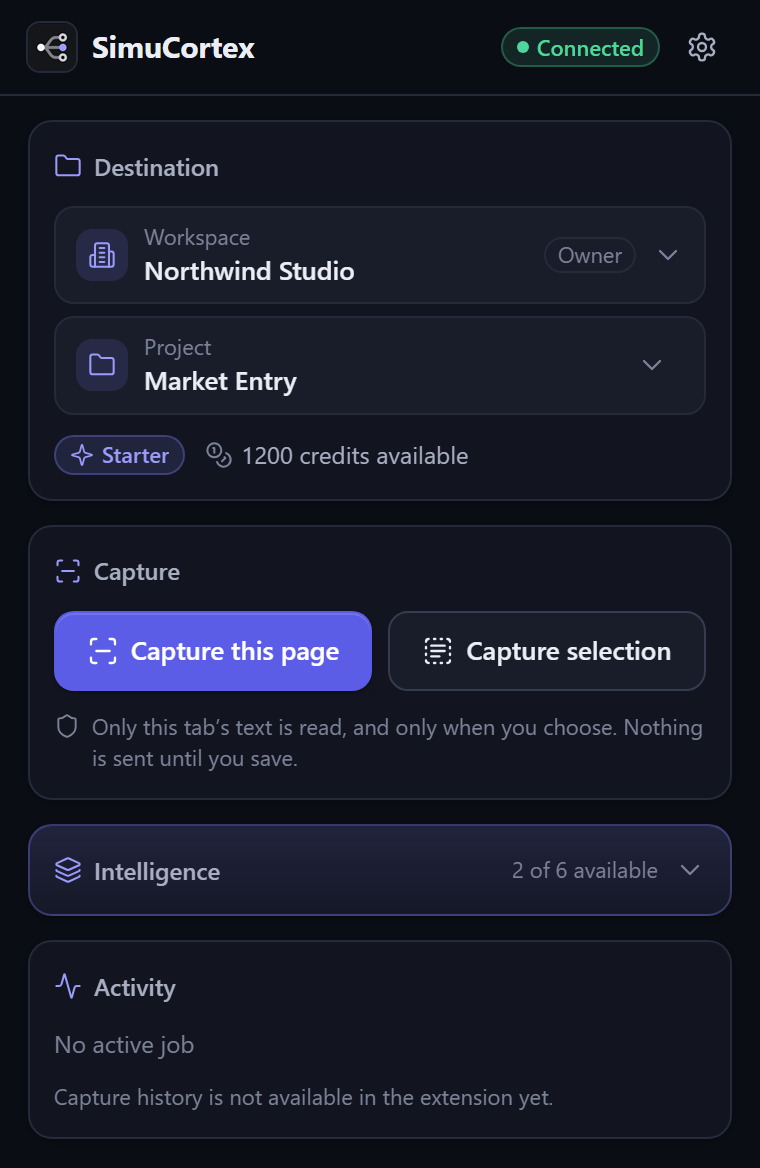
Screenshots of the current extension build, shown with fictional demo data.
Ready on any page
Your destination, plan and credits at a glance, with capture one click away.
Choose workspace and project
Only the workspaces and projects your role allows, with your role shown.
Capture this page
The readable text of the page, with its title and source, ready to review.
Capture a selection
Only the passage you highlighted, kept with its source link.
Evidence saved
A clear confirmation of where it was saved, with a link into SimuCortex.
Plan-aware access
Included analyses are marked available; others show the plan they require.
Settings and account
Language, account links and sign-out in one compact view.
Right-to-left ready
Every one of the 20 languages, including a true right-to-left Arabic layout.
Fictional demo data
See what your plan includes.
The popup uses the selected workspace package. Five analysis types can be quoted, confirmed and queued in the popup; Advanced Simulation opens its full web workspace. Every premium request is authenticated, entitlement-checked, priced by the server and credit-checked before it is queued.
From Starter
Quick AI
A structured first read of your question, its options and trade-offs.
From Starter
Evidence/RAG
Analysis grounded in the evidence you saved, with citations to the passages used.
From Free
Create Scenario
Create a named scenario with a decision question and optionally include the reviewed capture as context.
From Pro
Deep Scenario
Baseline, assumptions, actors and alternatives compared across scenarios.
From Pro
Multi-Agent
Independent analyst, risk, evidence, stakeholder and challenger roles with a synthesis.
From Pro
Advanced Simulation
Seeded Monte Carlo runs kept separate from the model’s interpretation.
Job status at a glance
The popup restores active jobs, refreshes queued and running status while open, and provides authorized recent results, cancellation and report links.
One extension. Capabilities follow your plan.
Your plan, workspace role and credit balance are checked on the server for every request. Upgrade and new capabilities appear without reinstalling.
Free
- Connect your account, workspaces and projects
- Capture and preview pages or selected text
- Create scenarios from what you capture
- AI analysis is visible and locked
Starter
- Quick AI analysis
- Basic Evidence/RAG with saved captures
- Starter workflows with 1,000 monthly credits
Pro
- Deep Scenario and Multi-Agent
- Advanced Evidence/RAG
- Advanced Simulation
- Premium Reports and 5,000 monthly credits
Business
- Everything in Pro
- Shared workspaces and projects
- Team roles and permissions respected
- 20,000 shared monthly credits
Enterprise
- Capabilities defined by your contract
- Users, credits and limits by agreement
- Approved enterprise distribution where agreed
You decide what is captured.
No passive browsing collection
The extension reads a page only when you choose Capture. It does not record your browsing history or watch the sites you visit.
No hidden scraping
Nothing is captured automatically or in the background. Every capture is shown to you before it is saved.
No passwords in the extension
You sign in on simucortex.com. The extension keeps only scoped, revocable tokens, never your password, payment details or provider keys.
Server authority
Workspace access, plan features and credits are verified on the server for every request. The popup cannot unlock anything on its own.
For Chrome and Microsoft Edge
Install buttons activate only after each official store publishes the listing. We never link to unofficial downloads.
Chrome
Coming soon
Add to ChromeMicrosoft Edge
Coming soon
Get for Microsoft Edge
Frequently asked questions
Which browsers are supported?
Chrome and Microsoft Edge, both built on Manifest V3. Each store listing goes live separately; this page shows its current state.
Does the extension replace the web app?
No. It is a capture and quick-action companion. Larger workflows, full reports and team administration stay in SimuCortex.
Can I run AI analysis with no credits?
No. The server checks the operation’s cost against your available balance before reserving credits. Your saved data and the 20 local tools remain available.
Does it read every page I visit?
No. It reads a page only when you choose a capture action, and you review the capture before saving it.
How do I sign out?
Choose Sign out in the extension settings, or revoke the extension session from your account security settings. Revocation takes effect immediately.
Start in SimuCortex today.
Create a free account, explore the 20 local tools and set up a project. The extension connects to it when you install it.